Can users self-register as a reviewer?
It is up to the journal to decide - the Journal Manager or Editor is able to configure the journal so that users are able to self-register their account with the Reviewer role, or not.
The advantage of allowing users to self-register is that the reviewer database will organically grow as people use the platform (e.g. authors will put their names into the reviewer database), meaning that the editors may find it easier to locate suitable and willing reviewers. Self-registration also ensures that the user has consented to their data being included.
The disadvantage of self-registering as reviewers is that it is possible that the reviewer database will include unsuitable users. However, regardless of how a user is added to the reviewer database, the editor should always scrutinise the reviewer’s suitability for the task prior to inviting them.
Instructions
- Log in as a Journal Manager or Editor.
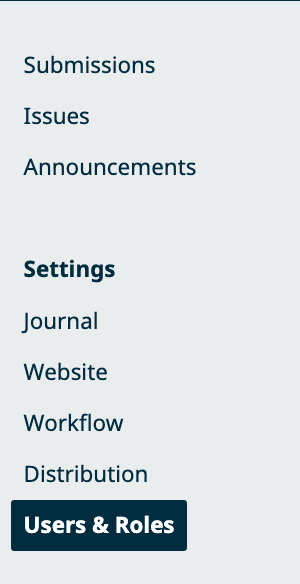
- In the left sidebar, go to: ➤ Users & Roles → Roles
- Locate the Reviewer role and click Edit (pencil icon).
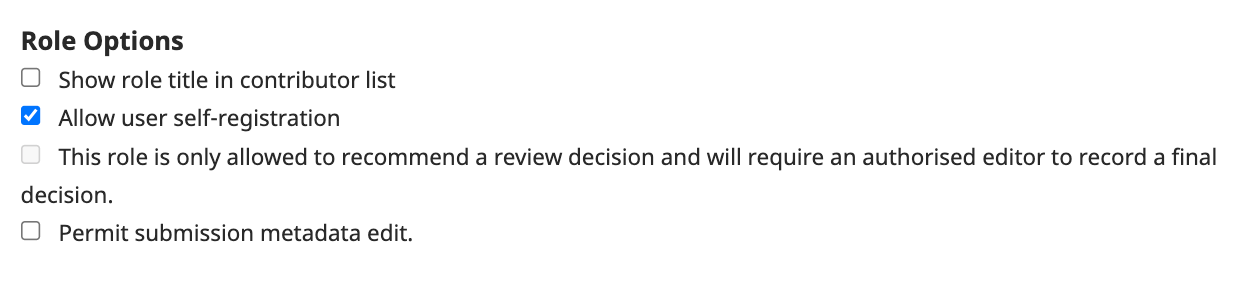
- Uncheck/Check the option, depending on which option you want: ➤ "Allow user self-registration"
- Save the changes.