
What user roles settings does a journal have?
User Users & Roles > Roles settings menu governs who can access what in the editorial workflow.

A flexible user role system is provided so that you can tailor the roles to your needs. On the Roles tab, you'll see a list of default roles created by the system. These can be deleted, edited, or custom roles added on a journal-by-journal basis.
All roles are given one of a few permission levels which allow them to perform various actions in the system:
- Authors can make new submissions and manage their submission through the author workflow.
- Reviewers appear when you're assigning reviews in the Editorial Workflow and have access to the reviewer workflow when they're assigned to a review task.
- Readers, like all other user types, can access the reader-facing website. All users have this role option. Users with the Reader role enabled may receive occasional emails from the journal system - e.g. when a new issue is published.
- Journal Managers have access to the entire Editorial Workflow, as well as most of the settings. Users with this setting will be able to see all submissions, regardless of whether they are assigned to them or not. Journal Editors will normally use this permission level.
- Section Editors and Journal Assistants can access only those parts of the Editorial Workflow assigned to their role. Users with these permissions will only be able to access submissions for which they are assigned. They will not see any submissions that are not directly assigned to them.
A single user may be allocated a combination of all of the above roles.
In addition to the permission levels, you can restrict some roles to particular stages of the Editorial Workflow.
Recommended decision editor permissions
If a set of journal editors should only be permitted to make a recommendation, rather than log a formal editorial decision then this restriction is set within the Roles tab - e.g. perhaps Guest Editors are permitted to run the peer review process but the Editor-in-Chief still needs to sign off on their decisions prior to notifying the author.
To restrict a Role to only have permission to recommend decisions:
- Access
Users & Roles > Roles -
Click the arrow next to desired Role and then the Edit button

-
Tick the ‘This role is only allowed to recommend a review decision and will require an authorised editor to record a final decision' option
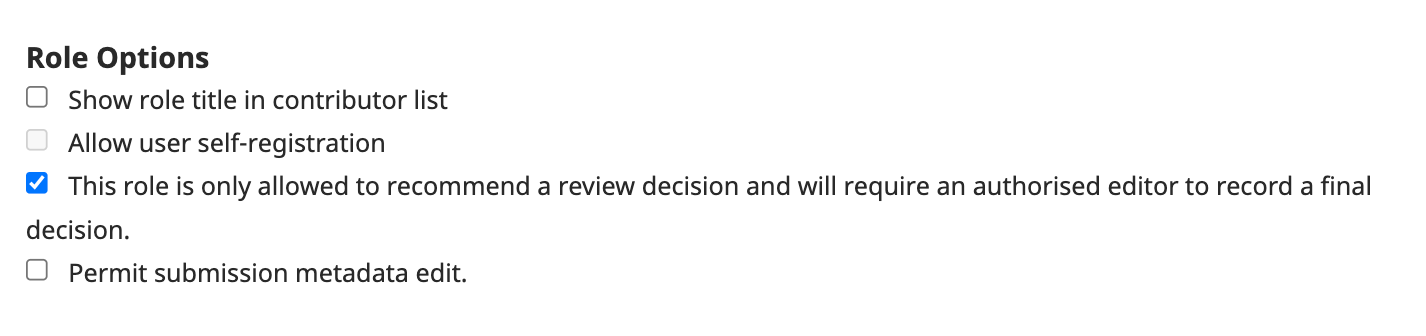
- Save the form
All users assigned to a submission with that selected Role will only be able to recommend editorial decisions to assigned Editors.